Choose your start date
At checkout you answer one question: what happens to the month you are signing up in. Up to three cards offer the answer.
Contracts start on the 1st of a month. If you sign up mid-month, the app asks how that part month should be handled. You answer with a single choice. No free date picker appears for it.
How to choose
- In checkout go to the step with the question What about …?. Instead of the dots it names the running month, such as What about September?.
- Pick one of the cards.
- Tap Continue and finish the contract.
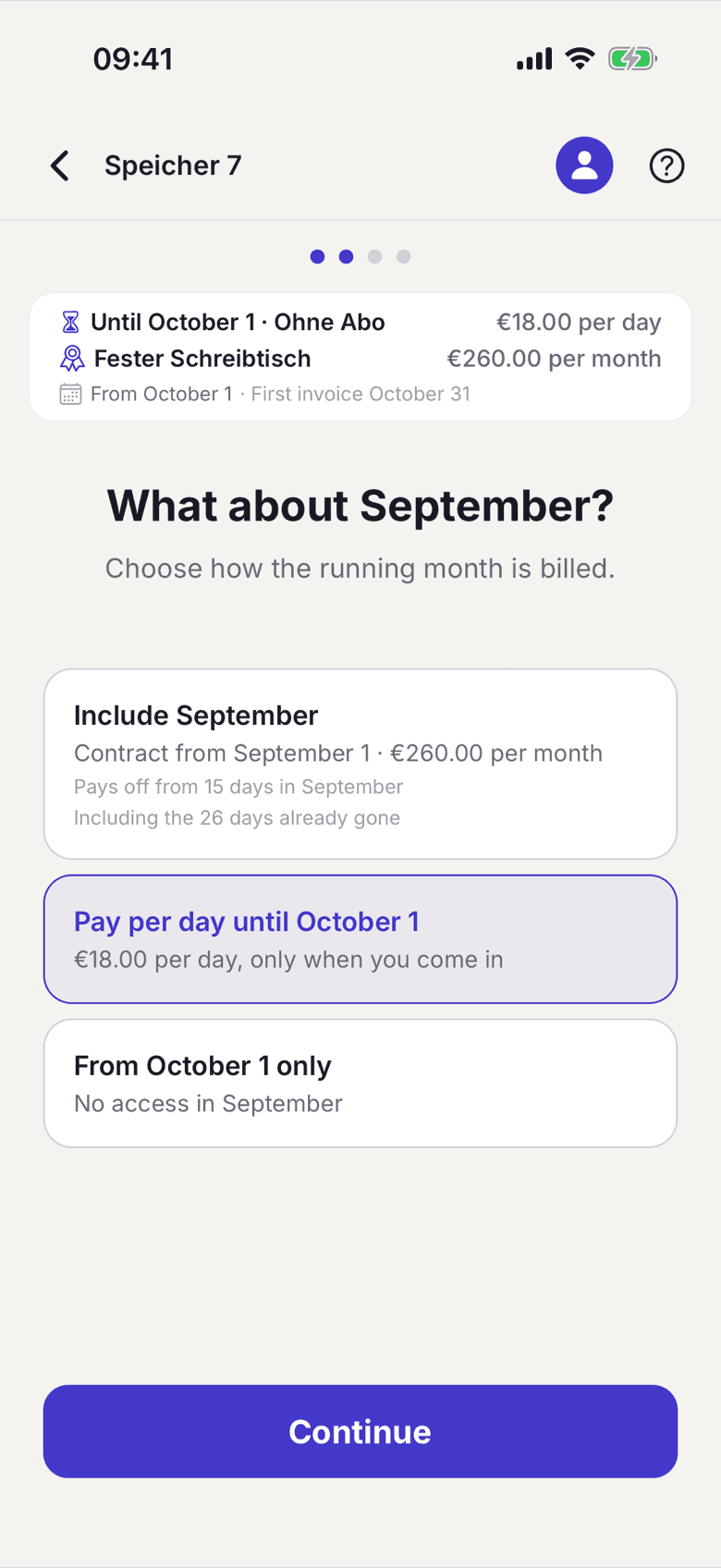
The cards
| Card | What it means |
|---|---|
| Include …, such as Include September | Your contract starts back on the 1st of this month. You pay the full base fee for the month and get everything the plan includes right away. |
| Pay per day until 1 … | The contract starts next month. Until then you only pay for the days you come in. |
| From 1 … only | The contract starts next month and you do not use the space before that. |
What applies here
- The back-dated card disappears once it can no longer pay off. If fewer days are left in the month than the base fee is worth in day prices, it is not offered.
- Nothing that charges for days already gone is preselected. On the 1st of a month nothing is in the past, so starting now is the preselection there.
- You can still change the start date you asked for while your contract is waiting for confirmation. The hint on the home screen takes you back. If your space prepared the contract for you, for example with an invitation, only the space changes the date.
- If your plan needs a fixed desk, the per-day card does not appear. A day price does not come with a fixed desk.
When it does not work